
Importing Source Groups
An identity source can import its groups as Resource Control groups and keep their members in step with the source on every sync. You can then use them in provisioning policies, certifications and role mining like any other group. A source can never create Platform Control groups or grant console permissions.
A working identity source with its attribute mapping set up. See Configuring Identity Sources.
Identity → Identity Sources – View in an administrator group.
For LDAP and SCIM sources, memberships are direct only: nested groups are not expanded.
Turning on group import
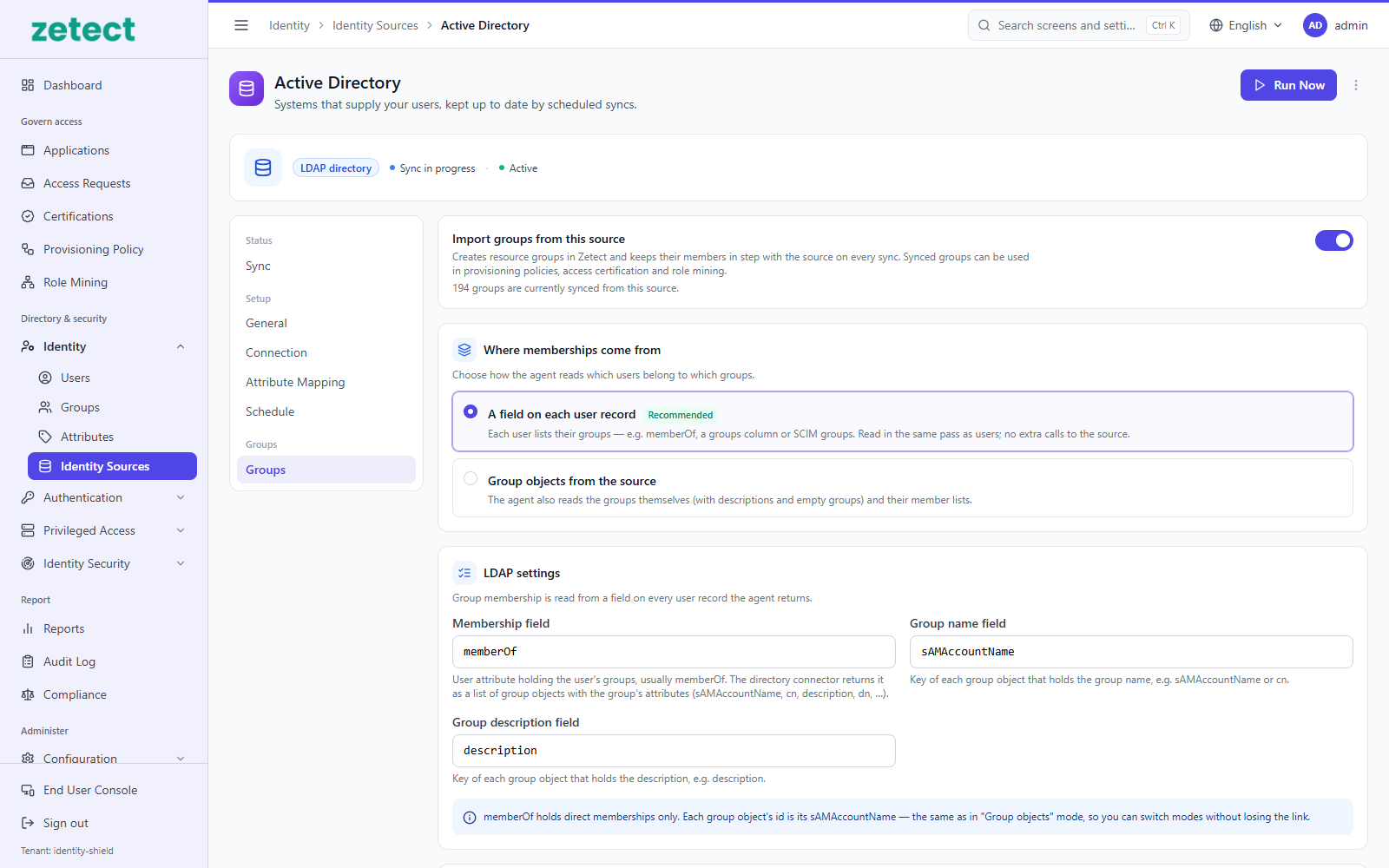
To turn on group import:
- Go to Identity → Identity Sources and open the source.
- Select Groups.
- Turn on Import groups from this source.
- Under Where memberships come from, choose a mode:
- A field on each user record (recommended) – each person's record lists their groups, for example
memberOf, a groups column or SCIM groups. It is read in the same pass as people, with no extra calls to the source. - Group objects from the source – the agent also reads the groups themselves, including descriptions and empty groups, and their member lists.
- A field on each user record (recommended) – each person's record lists their groups, for example
- Fill in the settings card for your source type. Its fields depend on the mode and type, and each has help text. See Membership settings.
- Under Which groups to import, narrow the import to the groups you will govern.
- Choose what happens on a name conflict and when a group leaves the source.
- Set the removal safeguard threshold.
- Preview the result. See Previewing the import.
- Select Save group settings.
Groups are imported during the next normal sync, from the schedule or Run Now. Once groups are synced, the card shows how many.
Membership settings
| Field | Description |
|---|---|
| Membership field | User-record mode. The field that holds the person's groups. For LDAP this is usually memberOf. For a delimited file it's a column such as groups, and the file needs a header row. For SCIM it's groups. For REST it's a field holding a list of groups, or one string to split. |
| Group name field / Group description field | LDAP, user-record mode. Which key of each group object holds the name (for example sAMAccountName or cn) and the description. |
| Value separator | Delimited file and REST. Splits one text value into several groups, for example ; for Finance;Payroll Team. Leave it blank for lists. |
| Name / ID inside each item | SCIM and REST. For lists of objects, the keys holding each group's name and ID. Leave them blank to use display/name and value/id. |
| Group objects settings | Group-objects mode. LDAP: Group search base DN, Group filter, Name attribute, Description attribute, Member attribute, Member value attribute, Only these groups (DNs) and Import only users who belong to these groups. SCIM: Member value attribute. REST: Groups endpoint, Response groups path, ID field, Name field, Description field, Members field and Member value attribute. Delimited file: Membership file path, Group column, Member column and Description column. |
Choosing groups, ownership and the safeguard
| Field | Description |
|---|---|
| Include groups matching | Comma-separated wildcards (* and ?) on the group name. Blank imports all groups. |
| Exclude groups matching | Wildcards for groups to leave out. |
| Minimum members | Skips groups with fewer members than this. |
| Name prefix in Zetect | Optional text added before each synced group's name, such as HR – , to keep synced groups apart from groups created by hand. |
| If a group with the same name already exists in Zetect | Skip it and report a conflict: the existing group is left alone. Take it over: the group becomes source-managed and its members are replaced by the source's. |
| When a group is no longer in the source | Deactivate the group: members are removed, and the group and its policies stay, marked inactive. Delete the group: policies that target it no longer match anyone. Keep as is: syncing stops and it becomes an ordinary Zetect group with its members. |
| Hold removals when a sync would remove more than … % of synced memberships | The removal safeguard. Additions still apply, but removals wait for an administrator in the Sync section. 0 turns the safeguard off. The default is 10. |
For example, department and application groups from a directory:
| Where memberships come from | A field on each user record |
| Membership field | memberOf |
| Group name field | sAMAccountName |
| Include groups matching | APP-*, DEPT-* |
| Exclude groups matching | *-Test |
| Minimum members | 1 |
| Name conflict | Skip it and report a conflict |
| Group no longer in the source | Deactivate the group |
| Removal safeguard | 10 % |
Previewing the import
The preview fetches from the source through the agent as a dry run. Nothing changes in Zetect.
To preview the import:
- In the source's Groups section, select Preview groups. Unsaved settings are saved first.
- Read the tiles: Groups found in source, Match your filters, New / already synced and Name conflicts.
- Check the membership changes, any synced groups that have left the source, and any warning that the safeguard would hold removals.
- Filter the table with the outcome pills or the search box.
- Select Back to settings when you're done.
The table lists each source group with its Zetect name, member count, matched people and outcome: New, Synced, Updated, Take over, Conflict or Excluded. Matched people are members Zetect already knows. Members who would be new identities count as unmatched. Previews appear in the run history with the trigger Preview.
How synced groups behave
- While import is on, a synced group's name, status and members can only be changed in the source. Under Identity → Groups it carries a Synced chip with the source's name and a lock, and Edit and Delete are hidden. You can still assign applications to it and use it in policies.
- Membership changes run the provisioning policies again for the affected people, the same as changing members by hand.
- Access granted through an approved access request is never revoked by a group change.
- If you turn import off, synced groups stay but are no longer updated.