
Identity Security Overview
Identity Security watches your identities for threats and checks how healthy your identity setup is. Identity Threat Detection and Response (ITDR) raises detections and responds to them through policies. Identity Security Posture Management (ISPM) measures controls and lists the findings behind them.
- See your security at a glance. The Overview tab shows an identity security score, the worst open detections and what needs attention.
- Respond to threats consistently. ITDR policies decide who is notified and which containing actions run automatically, wait for approval or are only recommended.
- Keep a full record. Every response is logged with who decided and what happened.
- Fix weak spots before they are used. ISPM controls list the users, accounts and settings that miss their target, each with a due date.
- Accept a risk for a limited time. Exceptions let someone else approve a finding as accepted until a set date.
Before you begin
- Identity Security doesn't calculate risk itself. Set up Behaviour Risk for sign-ins and activity, and Provisioning Risk and PAM Risk for accounts.
- Configure email so that Notify by email actions can be delivered.
- Aggregate your applications regularly. Changes on target systems are seen only after the next aggregation. See Aggregating Accounts and Entitlements.
ITDR – View or ISPM Posture – View in an administrator group shows Identity Security → Overview. ITDR shows the Detections, Actions and ITDR policies tabs. ISPM Posture shows the ISPM posture and Exceptions tabs. Edit and Grant on each are needed to change things and to approve.
Key concepts
- Detection
- A threat found by a detection rule, such as a risky login or a password spray, with a risk level and score.
- ITDR policy
- A rule that matches detections by risk level and decides which response actions to propose or run.
- Response action
- Something done about a detection, such as notifying administrators or locking a user. Each action has a mode: Automatic, Needs approval or Recommend only.
- Control
- An ISPM measure of posture, such as MFA coverage or dormant accounts, rated At risk, Watch or Healthy against a target.
- Finding
- One user, account or setting that causes a control to miss its target. Each finding has a due date.
- Exception
- An approved request to accept the risk of a finding until a set date.
- Tag
- A label that tells rules and controls what an identity is for, such as service account, decoy or break-glass.
Tasks in this topic
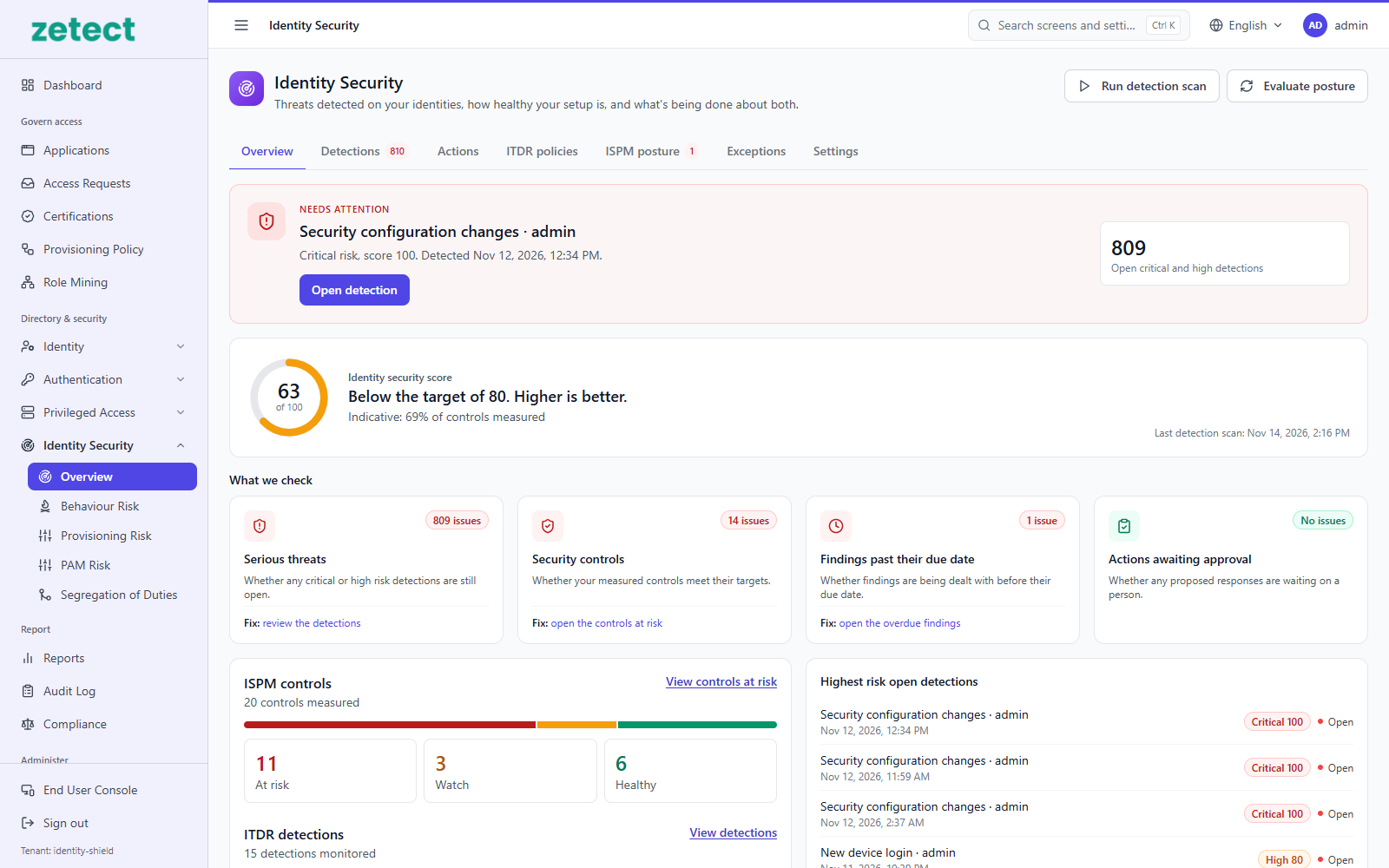
Reading the Overview tab
Start on Identity Security → Overview, then follow its links to the tab that needs work.
| Field | Description |
|---|---|
| Run detection scan | Runs the detection rules now. They also run every 5 minutes. Shown to people with ITDR – Edit. |
| Evaluate posture | Evaluates the ISPM controls now. They are also evaluated once a day. Shown to people with ISPM Posture – Edit. |
| Needs attention | The worst open critical or high detection, with its risk level, score and when it was detected. Select Open detection to review it. When there is none, a notice may show responses waiting for approval or findings past their due date instead. |
| Identity security score | A score out of 100 from your measured controls and detection rules, against a target of 80. Higher is better. The line below shows the share of controls measured, and says Indicative when too few controls have data for the score to be reliable. |
| Last detection scan | When the detection rules last ran. |
| What we check | Four cards: Serious threats, Security controls, Findings past their due date and Actions awaiting approval. Each shows No issues or a count, and a Fix: link to the right tab. |
| ISPM controls | How many controls are measured, split into At risk, Watch and Healthy. Controls with no data aren't counted. |
| ITDR detections | How many detection rules are monitored, split the same way. |
| Mean time to detect | The average time over the last 30 days from the first event to the detection, against a target of 60 minutes. It depends on how often applications are aggregated. |
| Mean time to contain | The average time over the last 30 days from detection until a containing action, such as ending sessions or locking the user, succeeded. The target is 240 minutes. |
| Highest risk open detections | The five worst open detections. Select one to open its details. |
What it covers
The results cover what Zetect can see: its own logins, MFA, configuration, PAM sessions and provisioning, plus connected applications at each aggregation. Events that happen only on a directory server or an external identity provider aren't seen.
Audit events and reports
The Audit Log records detection changes under ITDR Detection, every response under ITDR Action, policy changes under ITDR Policy, settings changes under ITDR Settings, and tags, findings and exceptions under ISPM. The dashboard offers ISPM posture and ISPM open findings widgets. See Configuring Dashboards.