
Reviewing Response Actions
Use the action log to see every response: what a policy recommended or ran, what waits for approval, what was skipped, who decided, and the result. Approvers run, approve, reject or dismiss actions from here.
Required permission
ITDR – View to see the log. ITDR – Grant to approve, reject, run or dismiss actions.
Limits
You can't approve or run an action against your own account.
Reviewing the action log
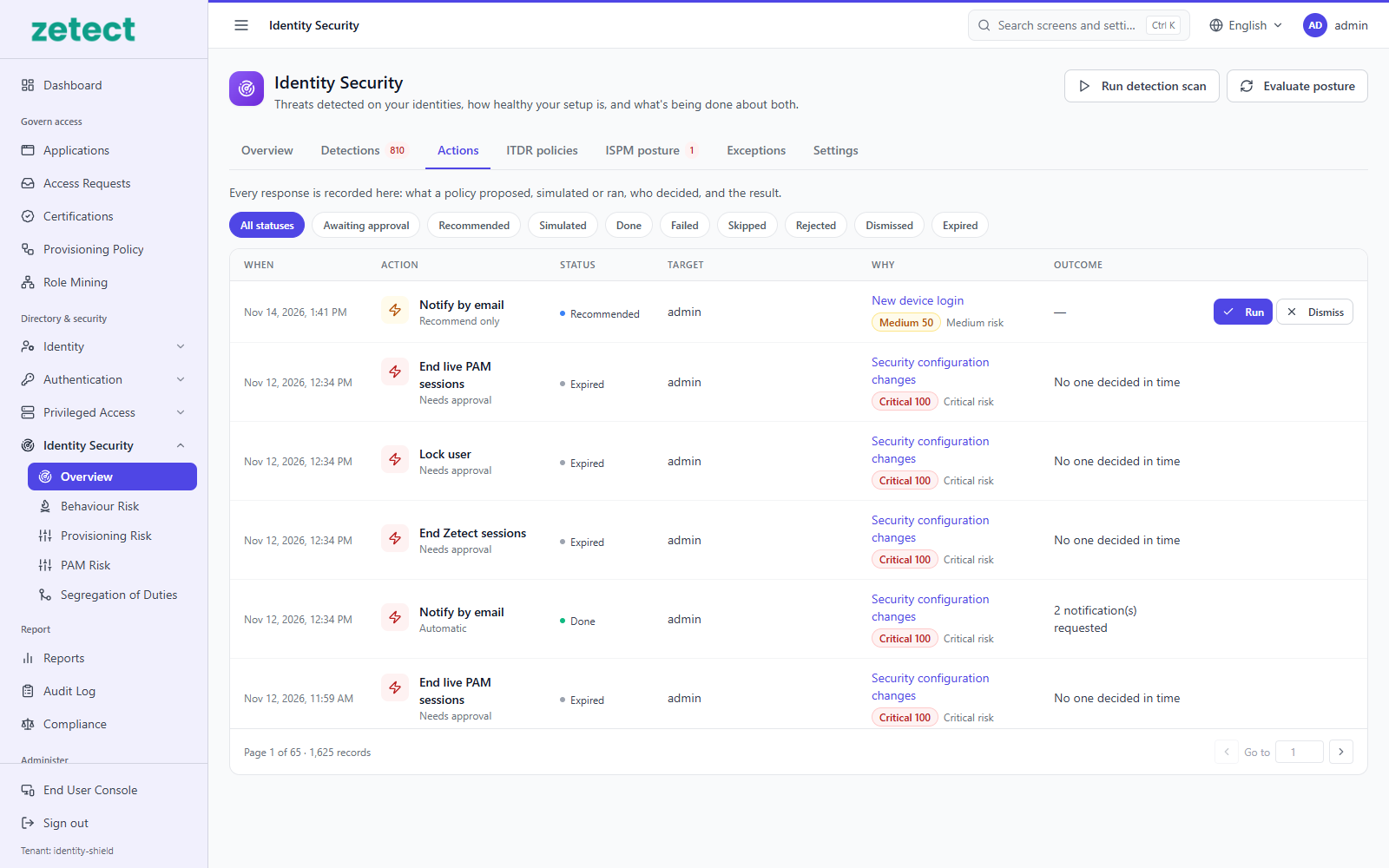
To review the action log:
- Go to Identity Security → Overview.
- Select the Actions tab. The tab shows how many actions are awaiting approval.
- Filter by status with the pills, for example Awaiting approval.
- To open the detection behind an action, select the rule name under Why.
| Column | Description |
|---|---|
| When | When the action ran, or when it was created if it hasn't run. |
| Action | The action, such as Notify by email, End Zetect sessions or Lock user, with its mode underneath: Automatic, Needs approval, Recommend only or Started by a person. |
| Status | Where the action is now. See Action statuses. |
| Target | The user or account the action applies to. |
| Why | The detection rule, its risk level and score, and the policy that proposed the action. Started manually means a person started it from the detection. |
| Outcome | The result, or the reason it didn't run. Also shows who decided, and when an approval expires. |
Deciding an action
To decide an action:
- On the Actions tab, find the action.
- For an action Awaiting approval, select Approve to run it, or Reject to decline it. Decide before the expiry time shown under Outcome.
- For a Recommended action, select Run to carry it out, or Dismiss to decline it.
An approved or run action takes effect at once, and its status changes to Done or Failed.
Action statuses
| Status | Meaning |
|---|---|
| Awaiting approval | Waiting for an approver. It lapses after the approval expiry time in Settings, 24 hours by default. |
| Recommended | Suggested by a policy. Someone with permission can run or dismiss it. |
| Simulated | An older entry recorded before each action had its own mode. Nothing ran. |
| Done | It ran. The outcome says what happened, for example how many notifications were sent. |
| Failed | It ran but failed. The outcome gives the reason. |
| Skipped | There was no user or account to act on. For example, a password spray across many usernames has no single user to lock. |
| Rejected | An approver declined it. |
| Dismissed | A recommended action was declined. |
| Expired | No one decided in time. |
Guardrails
These apply whatever a policy says:
- No action deletes anything.
- Automatic actions on administrators and break-glass accounts wait for approval.
- Automatic actions stop at the hourly limit in Settings. The rest wait for approval.
- Nobody can approve or run an action against their own account.
- Suspend target account works only on directory accounts and needs an online agent. It isn't queued when no agent is online.
Actions mostly apply to Zetect. Ending sessions, locking a user and forcing a password change affect Zetect sign-ins, not the user's sessions on other systems.