
Configuring Reminders and Alerts
Send reminder emails for work that is waiting on someone: pending access-request approvals, certification reviews and open Segregation of Duties violations, plus a notice before SoD exemptions or shared account access end. Every reminder type is off until you turn it on.
Reminders & Alerts – View to see the settings and Reminders & Alerts – Edit to change them, under Configuration in an administrator group. This is the same permission as Email Templates.
Tenants licensed for Identity Governance (IGA).
Email delivery set up. See Configuring Email.
Turning on a reminder type
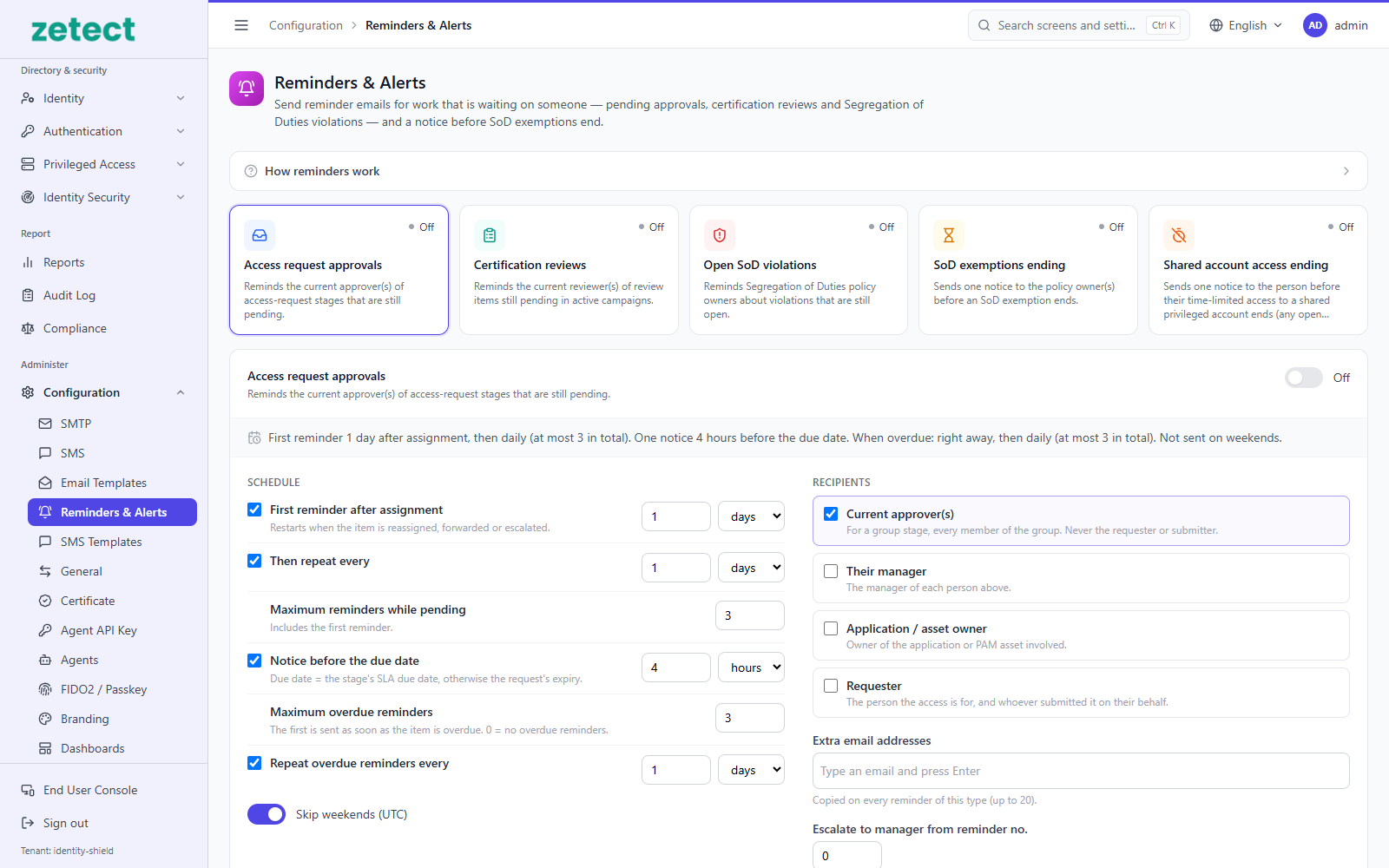
To turn on and schedule a reminder type:
- Go to Configuration → Reminders & Alerts. Expand How reminders work for a summary of the rules.
- Select a reminder type card at the top, for example Access request approvals. Each card shows whether it is On or Off.
- Turn the type's switch on.
- Under Schedule, tick the steps you want and set their periods. The sentence above the form restates the schedule in plain words.
- Under Recipients, choose who receives the reminder.
- Add any Extra email addresses.
- Optionally, set Escalate to manager from reminder no.
- Select Preview to see how many open items would be reminded now. Nothing is sent.
- Select Save in the unsaved-changes bar.
Reminders start on the next check, which runs every 5 minutes. Select Discard to drop unsaved changes, or Reset to defaults to start over.
Reminder types
| Type | Who is reminded, and the due date |
|---|---|
| Access request approvals | The current approvers of pending access-request stages. For a group stage, every member of the group, never the requester or submitter. Due date: the stage's SLA due date, otherwise the request's expiry. |
| Certification reviews | The current reviewers of review items still pending in active campaigns. Due date: the stage's due date, otherwise the campaign run's due date. |
| Open SoD violations | The owners of the SoD policy that was violated. Due date: detection time plus Resolve within. |
| SoD exemptions ending | One notice to the policy owners before an exemption ends. |
| Shared account access ending | One notice to the person before their time-limited access to a shared privileged account ends. Any open session is closed when it ends. |
Reminder fields
| Field | Description |
|---|---|
| First reminder after assignment | When the first reminder goes out. The clock restarts when the item is reassigned, forwarded or escalated. |
| Then repeat every | How often to repeat while the item is pending. |
| Maximum reminders while pending | The most reminders sent while pending, including the first. |
| Resolve within | SoD violations only. The target time to resolve a violation, which sets its due date. |
| Notice before the due date | One extra notice this long before the due date. |
| Maximum overdue reminders | Once overdue, a reminder is sent right away and then repeated up to this number. 0 means no overdue reminders. |
| Repeat overdue reminders every | How often to repeat overdue reminders. |
| Notice before the exemption ends / access ends | For the two "ending" types. A single notice per exemption or grant. Keep it short for hour-long grants. |
| Skip weekends (UTC) | Nothing is sent on Saturday or Sunday. |
| Recipients | The person the item is waiting on, plus optionally Their manager, the Application / asset owner or the Requester, depending on the type. |
| Extra email addresses | Copied on every reminder of this type, up to 20. |
| Escalate to manager from reminder no. | From this reminder on, the assignee's manager is added. 0 turns it off. |
How reminders are sent
- Reminders are checked every 5 minutes and combined into one digest email per person.
- Each item is reminded at most once every 4 hours.
- Periods are whole numbers from 1 to 365, and counts from 0 to 50.
- The email text for each type is edited in Email Templates. See Configuring Email.
Overriding reminders for one object
A request configuration, certification campaign or SoD policy has its own Reminders section.
To give one object its own reminders:
- Open the request configuration, campaign or SoD policy.
- In its Reminders section, choose one of these:
- Use global settings – follow this page.
- Turn reminders off for this object.
- Custom – set its own schedule and recipients.
- Save the object.
A custom setting is used even when the global type is off. On this page, each type lists the objects that use their own settings.
Event alerts
One-off alerts, such as a new access request, a review assigned or a new SoD violation, are not set here. Turn each on or off with its template's switch in Email Templates. Who receives SoD alerts is set on each SoD policy. See Configuring Email and Managing SoD Policies.
Example
Approval reminders that escalate on the third reminder:
| Type | Access request approvals · On |
| Schedule | First after 1 day, then daily, at most 3; notice 4 hours before the due date; when overdue, daily, at most 3; skip weekends |
| Recipients | Current approvers; their manager from reminder no. 3 |