Provisioning Risk Rules
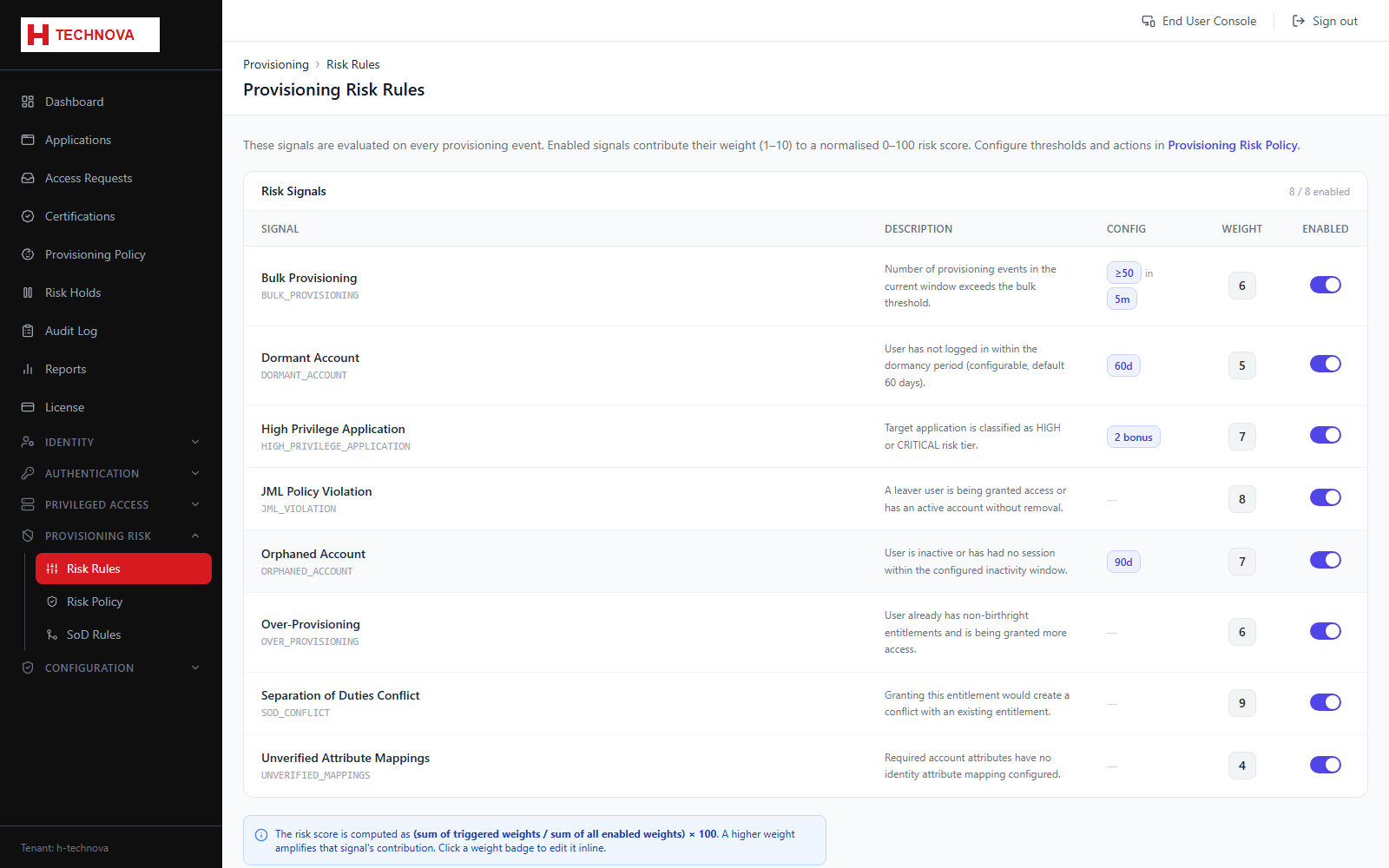
A fixed catalog of graded risk signals is evaluated on every provisioning action. Enabled signals contribute their weight toward a normalised 0–100 risk score, which the risk policy then acts on (allow, flag, hold, or block).
How to use it
- Open Provisioning Risk → Risk Rules to see the tenant-wide signal catalog (Dormant Account, Over-Provisioning, Excessive Entitlements, SoD Conflict, and others).
- Toggle a signal on or off, and set its weight (1–10) — how much it contributes to the normalised score relative to the other enabled signals.
- Where a signal has its own thresholds (e.g. Dormant Account's inactivity window, Excessive Entitlements' peer-group attribute), configure them inline.
- To override a signal for one application instead of tenant-wide, use that application's own Risk Rules tab.
Field reference
| Field | Description |
|---|---|
| Signal | The specific risk check, e.g. Dormant Account or SoD Conflict — the catalog itself isn't editable, only whether each signal is enabled. |
| Weight | How heavily this signal counts toward the normalised 0–100 score when it fires, relative to the other enabled signals. |
| Config | Signal-specific thresholds, where applicable — e.g. dormancy days, peer-group attribute, grace period. |